Headers
In Mockoon you can easily define response headers for each route but also at the environment level. Response headers defined on a route will override those defined in an environment.
Route level response headers
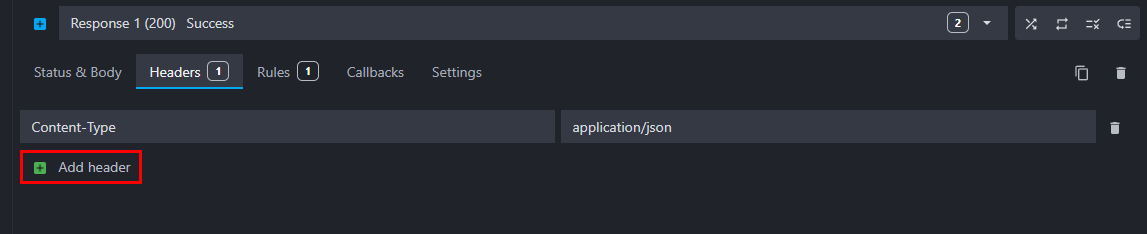
To add response headers like Content-Type to your route, go to the route's Headers tab and fill the name and value fields:

You can add one or more headers by clicking on the "Add header" button at the bottom of the list:
Environment level response headers
You can also add response headers at the environment level. Headers defined in an environment will be overridden if they are redefined on a route. To define an environment response header:
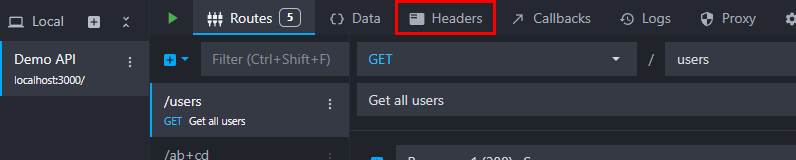
Open the Environment Headers by clicking on the tab at the top of the window:
And add one or more headers by clicking on the "Add header" button at the bottom of the list:

Specific headers
Content-Type charset override
By default, Mockoon serves responses using UTF-8 encoding. You can override the default charset=utf-8 by explicitly defining a Content-Type header with a different charset (or without a charset) at the route or environment level.
For example, to serve a payload with ISO-8859-1 or UTF-16 encoding:
- Header name:
Content-Type - Header value:
application/json; charset=iso-8859-1(ortext/xml; charset=utf-16)
Mockoon will preserve your exact header value without forcing the charset=utf-8 suffix.
Connection/Upgrade headers
By default, the Connection and Upgrade request headers containing something else than websocket are ignored by Mockoon and will have no effect on the response.
However, when your mock contains a WebSocket route, Mockoon will use these headers to upgrade the connection to a WebSocket connection. In this case, passing an Upgrade header without the value websocket will result in a 400 Bad Request response.
Mockoon response headers
Mockoon adds the following headers to all responses:
X-Mockoon-Callback-Depth: to prevent infinite callback loops (see Using callbacks)
Route metadata headers, enabled by default in the desktop application and disabled by default in the CLI (use the --enable-route-metadata-headers flag):
X-Mockoon-Route-Uuid: the route UUID that handled the request.X-Mockoon-Route-Response-No: the response number that handled the request (starting at 1).X-Mockoon-Route-Response-Uuid: the response UUID that handled the request.